
Facebook shared inbox: how to handle Page messages as a team
By HelpStack
Most teams discover they need a Facebook shared inbox the same way: two agents answer the same customer within a minute of each other, with different answers. Or a message from Tuesday gets found on Friday, three days after the customer bought from someone else.
Facebook messaging is easy to start and hard to run as a team. This guide covers what a shared inbox for a Facebook Page actually means, what Meta gives you for free, and the two constraints that catch people out.
What is a Facebook shared inbox?#
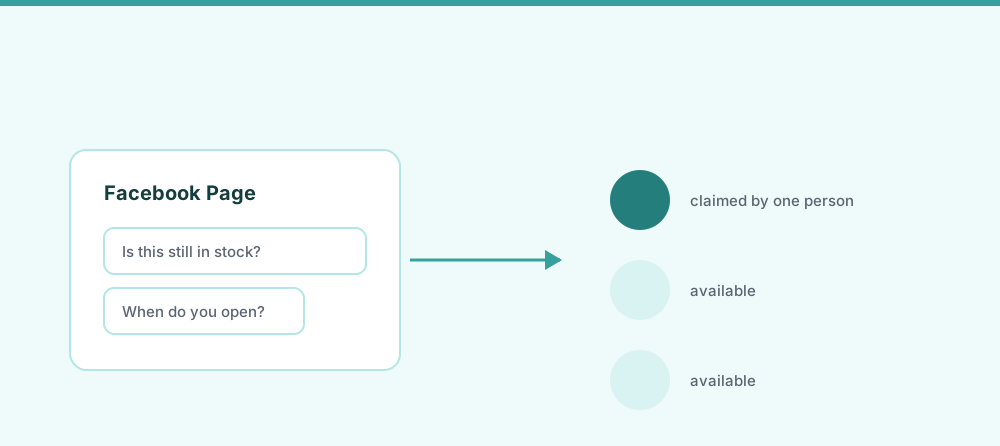
A Facebook shared inbox is a single queue where multiple team members read, assign, and reply to your Facebook Page messages, each with their own login, and with a visible owner on every conversation.
The two words doing the work are shared and inbox. Shared means several people, each identified, not one password passed around. Inbox means one queue with history and ownership, not a notification badge that whoever gets to first happens to clear.
That distinction matters because Facebook already lets several people access a Page. Access is not the same as a shared inbox.
Page roles give access, not accountability#
A Facebook Page lets you grant other people access to manage it. That solves the login problem: nobody shares a password, and you can remove someone when they leave.
What it does not solve is who is handling which conversation.
| Page access | Shared inbox | |
|---|---|---|
| Separate logins per person | Yes | Yes |
| Remove a person cleanly | Yes | Yes |
| Assign a conversation to one agent | No | Yes |
| See who is already replying | Not reliably | Yes |
| Internal notes on a thread | No | Yes |
| History that survives staff changes | Partial | Yes |
| Same queue as email and other channels | No | Yes |
| Response time you can measure | No | Yes |
Two people with legitimate access can still open the same message and send two different answers. That is the collision problem, and permissions do not touch it.
What Meta Business Suite covers#
Meta provides an inbox for Page messages, and for many teams it is genuinely enough. It is free, it needs no setup beyond having a Page, and it puts Facebook and Instagram messages in the same window. If you are one or two people handling a manageable number of messages, start there. A tool you do not need is overhead.
Where teams outgrow it tends to be specific rather than general:
- Assignment is light. You can label and mark things, but explicit ownership per conversation with a visible assignee is weaker than a purpose-built inbox.
- Facebook and Instagram, but not the rest. Email, website chat, and WhatsApp live somewhere else, so your support surface is still split across tools.
- Reporting is thin. First response time and resolution time per agent are hard to get at.
- Context stops at the platform. If your customer is also an order in your store, that information is in another tab.
Meta changes this product regularly, so check the current feature set before deciding it cannot do what you need. The honest summary is that it is a good free inbox for Facebook and Instagram, and not a support system for a team running several channels.
The 24-hour window, and why replies fail#
This is the constraint that surprises people most, and it is worth understanding before you pick any tool.
When a customer messages your Page, you get a standard window of about 24 hours to reply through the messaging API. Inside that window you can respond normally. Once it closes, ordinary replies are refused, and you need one of Meta's specific exceptions to send anything at all. One of those exceptions covers human agents replying later, and it extends the window considerably, but it is not unlimited and it is not automatic.
Two practical consequences:
- Overnight and weekend messages are a real risk. A message that arrives Friday evening and is opened Monday morning may already be outside the standard window.
- Any tool you use is subject to the same limit. This is a Meta platform rule, not a feature a vendor can switch off. Be suspicious of anyone who implies otherwise.
The operational answer is not a clever tool, it is making sure messages are seen inside the window. That is exactly what assignment and a visible queue are for. Meta publishes the current windows and exceptions in its platform documentation, and the specifics do change, so verify them rather than trusting a blog post, including this one.
Comments are not messages#
The other blind spot: a Facebook Page receives two separate streams. Direct messages, and comments on posts and ads.
They behave differently. A comment is public, it sits under a post where other prospective customers read it, and it is not in your message inbox. Teams that carefully triage DMs often leave comments unanswered for days without realising, because nothing surfaces them in the same place.
If a meaningful part of your customer contact arrives as comments on posts or ads, treat that as part of the same job. An unanswered question under an ad you are paying for is a more expensive miss than an unanswered DM.
Setting one up#
The mechanics are straightforward whichever tool you choose:
- Decide who handles messages. Two or three named people beats "whoever sees it".
- Connect the Page properly. A support tool connects through Facebook login and asks for permission to read and send Page messages. You are granting an app access, not handing over a password.
- Agree on ownership. One person per conversation, assigned, with the rest able to see it and add notes.
- Set an expectation for first response. Pick a number, then measure against it. The 24-hour window makes this operational, not aspirational.
- Cover comments too, not just DMs.
- Bring the other channels in once Facebook works. Support split across three tools recreates the original problem in a new shape.
What to look for in a tool#
- Real assignment, with a visible owner and a way to see that someone is already replying.
- Instagram in the same queue. Most teams that run a Facebook Page also run Instagram, and splitting them is arbitrary.
- Email and website chat too, so the shared inbox is genuinely one queue rather than a fourth tab.
- Comment handling, not just DMs.
- Reply drafting that saves time on repetitive questions while a human still approves what goes out.
- Translation, if you sell across borders, so agents are not pasting messages into a separate tab.
HelpStack does this: Facebook Messenger, Instagram DMs, WhatsApp, email, and website chat in one shared inbox, with AI reply drafting that a human approves and automatic translation in both directions. There is a free plan, so trialling it against your current setup costs nothing.
If you are still deciding whether you need a dedicated tool at all, the more general guide to shared inboxes works through that question without the Facebook specifics.
Next steps#
Two questions worth answering honestly. First, in the last month, has a Facebook message gone unanswered longer than a day? Second, would you know if it had? If the answer to the second is no, that is the actual problem, and it is a tooling problem rather than an effort one.
Frequently asked questions
- Can multiple people manage Facebook Page messages?
- Yes. A Facebook Page lets you grant several people their own access, so nobody shares a password. What Page access does not give you is conversation ownership: two people with legitimate access can still open the same message and send conflicting replies. A shared inbox adds assignment, visible ownership, and internal notes on top of that access.
- Is Meta Business Suite a shared inbox?
- It is a shared inbox in the basic sense: several people with Page access can read and answer messages from one place, and it covers both Facebook and Instagram. It is free and worth starting with. Teams tend to outgrow it when they need firm per-conversation assignment, response time reporting, or the rest of their channels such as email and website chat in the same queue.
- Why can I not reply to an old Facebook message?
- Meta applies a standard window of roughly 24 hours from the customer’s last message for replies sent through the messaging API. After it closes, ordinary replies are refused and only specific exceptions apply, one of which covers a human agent responding later and extends the window considerably. This is a platform rule that applies to every tool equally, so no vendor can remove it. Check Meta’s current platform documentation for exact limits, as they change.
- Do Facebook comments show up in a shared inbox?
- Not automatically, and this is a common blind spot. Direct messages and comments on posts or ads are separate streams, so a team that triages DMs carefully can still leave comments unanswered for days. Some support tools bring comments into the same workflow as DMs. If a meaningful share of your customer questions arrives as comments, particularly under paid ads, check that whatever you choose covers them.
- Do I need a separate tool for Instagram?
- You should not. Most teams running a Facebook Page also run Instagram, and splitting them across two tools recreates the coordination problem you were trying to solve. Meta Business Suite covers both, and dedicated shared inbox tools generally put Facebook Messenger and Instagram DMs in the same queue as email and website chat.