
What is a shared inbox? A guide for growing support teams
By HelpStack
Most small support teams start the same way: one Gmail account, a shared password, and a daily scramble to see who replied to what. It works — until it doesn't. Messages fall through the cracks, customers get double replies, and nobody knows whether Thursday's question was ever answered. A shared inbox solves exactly that.
What is a shared inbox?#
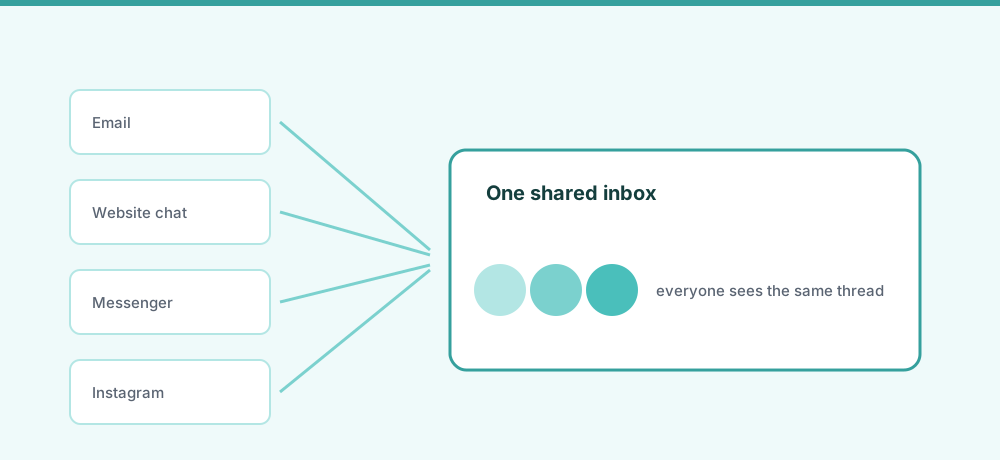
A shared inbox is a single mailbox or messaging queue that multiple team members access together — reading, assigning, and replying to customer messages from one place, with full visibility into who is handling what.
Unlike sharing login credentials, a purpose-built shared inbox gives each agent their own login while the queue stays centralized. Every message has an owner (or is visibly unassigned), every reply has an author, and no two agents accidentally answer the same thread. Tools range from a shared Gmail label all the way to a full omnichannel inbox that pulls email, Facebook Messenger, Instagram DM, WhatsApp, and live chat into one view. The core idea is constant: one queue, multiple people, no blind spots.
How does a shared inbox work?#
- Inbound messages land in one queue — email, Messenger, Instagram, chat, all in the shared view.
- Messages get assigned — manually (an agent claims it) or automatically (round-robin, rules).
- One agent owns the thread — others can see it, add internal notes, or take over, but there's a clear owner.
- Replies go out on the original channel — an Instagram customer gets an Instagram reply.
- History stays with the thread — every reply, note, and status change is logged.
The difference from a forwarded group inbox is accountability: you see not just what was said, but who said it and when.
Shared inbox vs. distribution list vs. personal inbox#
| Feature | Personal inbox | Distribution list | Shared inbox |
|---|---|---|---|
| Who can see messages | One person | Everyone (own inbox) | All agents, one place |
| Assignment | None | None | Explicit owner per thread |
| Collision prevention | None | None | Yes — assigned status visible |
| Conversation history | Siloed | Fragmented | Centralized on the thread |
| Internal notes | No | No | Yes |
| Multi-channel support | Email only | Email only | Email, social DMs, chat |
| Accountability | Inbox owner | Unknown | Assigned agent |
A distribution list copies each email to everyone's personal inbox — no ownership, no history, collision-prone. Fine for newsletters, a disaster for support. A personal inbox has ownership but zero visibility. A shared inbox combines the visibility of a list with the accountability of ownership — without the collisions.
Key benefits of a shared inbox#
- No more "who replied to this?" — every thread shows its agent and full history.
- Fewer messages slipping through — unassigned messages are visible and flagged.
- Consistent customer experience — context travels with the thread, so customers don't repeat themselves.
- Multi-channel in one place — email and social handled coherently.
- Measurable response times — first-response and resolution time become trackable.
- Easier onboarding — a new agent sees full history on day one.
Common mistakes teams make without one#
- Shared login — two agents open the same message and send contradictory replies.
- Forwarding chain — a support@ address forwards to four inboxes; everyone waits for someone else.
- Social blind spot — Instagram DMs and Messenger go unread for days.
- Reply from a personal address — the thread leaves the team's view for good.
- No context on handoff — an agent goes on holiday and the cover agent has to ask the customer to repeat everything.
When does a team actually need one?#
- More than two people handle support
- Customers reach you on more than one channel
- You've had a "we both replied" incident
- Response time has become unpredictable
- You want to assign or escalate messages
For most teams, the trigger lands somewhere between 50 and 200 customer messages a week. Before that, a tool can be overhead; after that, the overhead of not having one grows faster than the team does.
What to look for in a shared inbox tool#
- Channel coverage — email only, or also social DMs and chat?
- Assignment and routing — manual works at low volume; automation matters as you scale.
- AI assistance — reply suggestions cut the time agents spend drafting repetitive answers.
- Translation — built-in auto-translation means no copy-pasting into a separate tab for multilingual customers.
- Collision prevention — a clear "assigned to" or "typing" signal that stops double replies.
- Conversation history — the full thread, including internal notes, visible to any agent.
HelpStack is one option worth knowing about if your team handles email, Facebook Messenger, Instagram DM, WhatsApp, and website chat from one queue. Its AI reply suggestions reduce drafting time, the social inbox brings all social DMs into one view, and automatic translation handles multilingual conversations — built for the team juggling tabs and losing threads, not a 50-person contact center.
Platform-specific guides#
The mechanics differ by channel, and social platforms add constraints that email does not have:
- Facebook shared inbox covers Page access versus conversation ownership, the 24-hour reply window, and why comments are a separate stream from DMs.
- Instagram DM shared inbox covers the account type and access setting that gate every tool, why story replies land in the DM queue, and the message requests tab.
Next steps#
If you recognized your team in the "common mistakes" section, the practical step is to ask whether your current setup survives your message volume doubling. If the answer is no, it's worth looking at a dedicated tool before the growth, not after.
Frequently asked questions
- What is the difference between a shared inbox and a help desk?
- A shared inbox is the core concept — one queue, multiple agents, clear ownership. A help desk is a more feature-complete product built around that concept, adding ticketing, SLA tracking, reporting, and often a customer-facing portal. All help desks have a shared inbox at their core; not all shared inbox tools are full help desks.
- Can I use Gmail as a shared inbox?
- Yes, with limitations. Google Workspace allows shared access to a support address, but Gmail lacks collision prevention, assignment and routing, social channel integration, and centralized conversation history. It works for a two-person team at low volume and breaks down quickly beyond that.
- Is a shared inbox the same as a distribution list?
- No. A distribution list sends a copy of each email to every member’s personal inbox with no central queue, ownership, or collision prevention. A shared inbox puts all messages in one place with explicit assignment and a single shared history. Distribution lists are for broadcasting; shared inboxes are for support.
- How does a shared inbox handle social media messages?
- In an omnichannel shared inbox, messages from Facebook Messenger, Instagram DM, WhatsApp, and other platforms are pulled into the same queue as email and chat. Agents assign and reply to social messages directly from the inbox without switching to the social app.
- How many people need to be on a team before a shared inbox makes sense?
- Two people can sometimes coordinate without tooling. Three or more reliably cannot. The stronger trigger than team size is channel count: if you handle messages on more than one channel, a shared inbox pays for itself in saved coordination time almost immediately.