
We built an MCP server, so you can set up HelpStack by describing it
By HelpStack
We shipped an MCP server for HelpStack. You can now connect Claude to your workspace and set the whole thing up by describing what you want, instead of clicking through settings screens.
This post is what it does, what it deliberately cannot do, and why we drew the line where we did.
The problem it solves#
Setting up a help desk is an afternoon of form-filling. Crawl the help centre. Wait. Write eight FAQ chips. Create an agent tool: name it, describe it, define its JSON parameters, paste the endpoint, add the auth header. Group the knowledge base articles. Attach the groups to the right channel. None of it is hard, all of it is tedious, and the tool descriptions in particular are the kind of writing people rush.
That work is a good fit for an assistant, because most of it is translation: from what you know about your business into the shapes our settings expect.
What it looks like#
You connect Claude to HelpStack once, with a token you create in Settings, then talk to it:
Crawl our help centre at mystore.si/pomoc, then add a tool that checks order status against our API at api.mystore.si. It needs the order number and the email the order was placed with, and it should only be used when the customer gives both.
It calls the crawl, waits, creates the tool with a parameter schema and a description written from what you said, and tells you what it did. The last clause of that sentence, about needing both the number and the email, ends up in the tool description where the model reads it before deciding to call the tool.
The 51 tools#
Reading is open to any team member. Changing anything needs an owner or admin, the same as the dashboard.
Knowledge base — crawl a website, re-run a crawl to reach deeper into a large site, delete a source, list articles, write one by hand, edit it, delete it, list and create groups.
Channels — list them, add a website chat channel (optionally with another channel's widget look), read or change how one behaves (AI replies on or off, sent straight to the customer or held as drafts, the team's language, translation, active or not), choose which knowledge base groups a channel answers from, and read or change a website chat channel's widget settings: colour, launcher position, greeting, attention grabber, business hours, page rules, allowed domains. Credentials are the one thing it cannot touch: connecting a mailbox or a Facebook page stays a dashboard job.
Agent tools — list, create, edit, delete, and read the call log for one tool.
FAQs — list, create, edit, delete the chips on the widget greeting screen.
Tags — read the taxonomy, add a tag, rename it, archive it, bring it back, and group tags into categories. Growth plan and up, because tagging is.
Routing — see who is on the team, then create, edit, reorder or delete the rules that hand a new conversation to an agent.
Your workspace — the business name customers see, the default language new channels inherit, and which notifications you personally receive. Adding team members, changing roles, creating tokens and anything to do with billing are deliberately not here: a token that could do those would escape its own permissions.
Conversations — list them, read a thread in full, draft a reply for a person to approve, or reply directly. The last two are separate permissions; more on that below.
whoami — which organization the token acts for, and with what role. Run it first.
The one people miss is attaching groups to a channel. Adding articles does not aim them anywhere: a channel with no groups attached searches your entire knowledge base, which is right when you have one topic and poor when you have five. Group them, attach the group, and that channel answers from that slice.
We said it would never touch conversations. We changed our mind.#
The first version of this post said, flatly, that these tools could not read a conversation or reply to anyone, and that we had thought hard about it. Both halves were true when written. The first is not any more.
What changed it was looking at how HelpStack already works: 57 of the 98 channels on the platform have auto-reply switched on, so the AI already answers customers with no human in the loop on most of them. Refusing to let an assistant read a thread, on a product that already sends replies by itself, was a line drawn from caution rather than principle.
So there are three more permissions, and none is on by default:
- Read conversations — the thread, including names, email addresses, and whatever a customer wrote.
- Draft replies — writes into the inbox for a person to approve. It cannot send. A draft sits inert until someone presses send in HelpStack, where the approval is recorded against their name.
- Send replies — answers the customer directly. Not implied by drafting, never ticked by default, and a sent message cannot be recalled.
They need the Growth plan, and an admin chooses per token whether to grant any of them at all. Setting up a workspace and reading a customer inbox are different promises; the person who decides which an assistant gets should be the merchant, per token, not us.
Want only the setup half? Tick nothing in the conversations group and those tools do not appear at all — an assistant is never shown a door it cannot open.
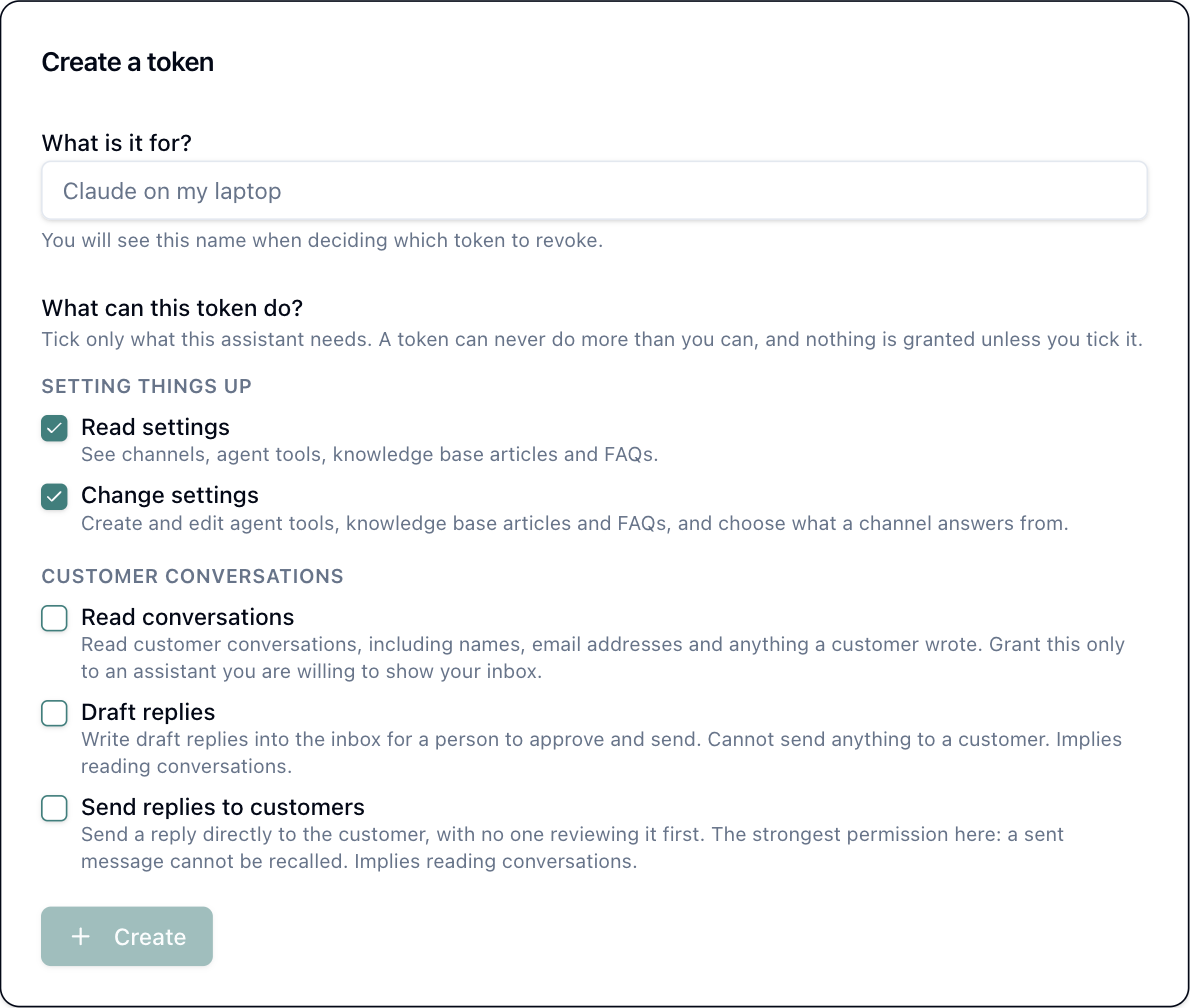
Every permission is off unless you tick it, and the two conversation ones are off even then unless you are on Growth. The screen is deliberately blunt about which is the dangerous one.
How the tokens behave#
A token is scoped to one organization, fixed when you create it. If you belong to several, you create one per organization. It acts as you, with your role as it is now, so demoting someone shrinks what their tokens can do on the very next call. Remove them from the organization and their tokens stop working with no cleanup step.
We store only a hash. The token is shown once and cannot be shown again, by us or by anyone. If you lose it, revoke it and make another; that takes ten seconds and is the intended path rather than a failure.
Getting it#
MCP is on the Starter plan and up. If you are on the free plan and want it, ask us, because it is a per-organization setting and we would rather switch it on for a business that needs it than have you conclude HelpStack cannot do this.
The setup is two lines: create a token in Settings, then point your MCP client at helpstack.eu/api/mcp with that token in an Authorization header. Claude Code, Claude Desktop, and anything else that speaks MCP over HTTP all work the same way, because there is nothing HelpStack-specific in the transport.
Full documentation, including the worked example and what each error means, is in our docs under Integrations.
Frequently asked questions
- Which plans include MCP?
- Starter and up, with the conversation permissions on Growth and up. It is a per-organization setting, so if you are on the free plan and need it, ask us and we will switch it on.
- Can Claude read my customer conversations through this?
- Only if you grant it. Reading conversations, drafting replies and sending them are three separate permissions, all off by default, all on the Growth plan and up. An admin ticks them per token, and a token that was not granted them cannot even see those tools.
- Does it only work with Claude?
- No. It is a standard MCP endpoint over HTTP. Any client that speaks MCP connects with a URL and an Authorization header. Claude Code and Claude Desktop are simply the ones we use.
- What happens if I lose a token?
- Revoke it in Settings and it stops working on the next call. We store only a hash, so a token cannot be shown twice or recovered by anyone, including us.