
Your support chat can now put products in the cart
By HelpStack
A shopper on your site opens the chat and asks what they need to start making filter coffee at home. Until this week the best a support assistant could do was answer in text and paste a link. The shopper clicks it, lands on the product page, finds the button, picks the option, adds it. Every step is a place to leave.
Now the reply shows the product as a card: picture, name, price, stock, and an Add to cart button that puts it straight into the shop's own cart without leaving the chat.
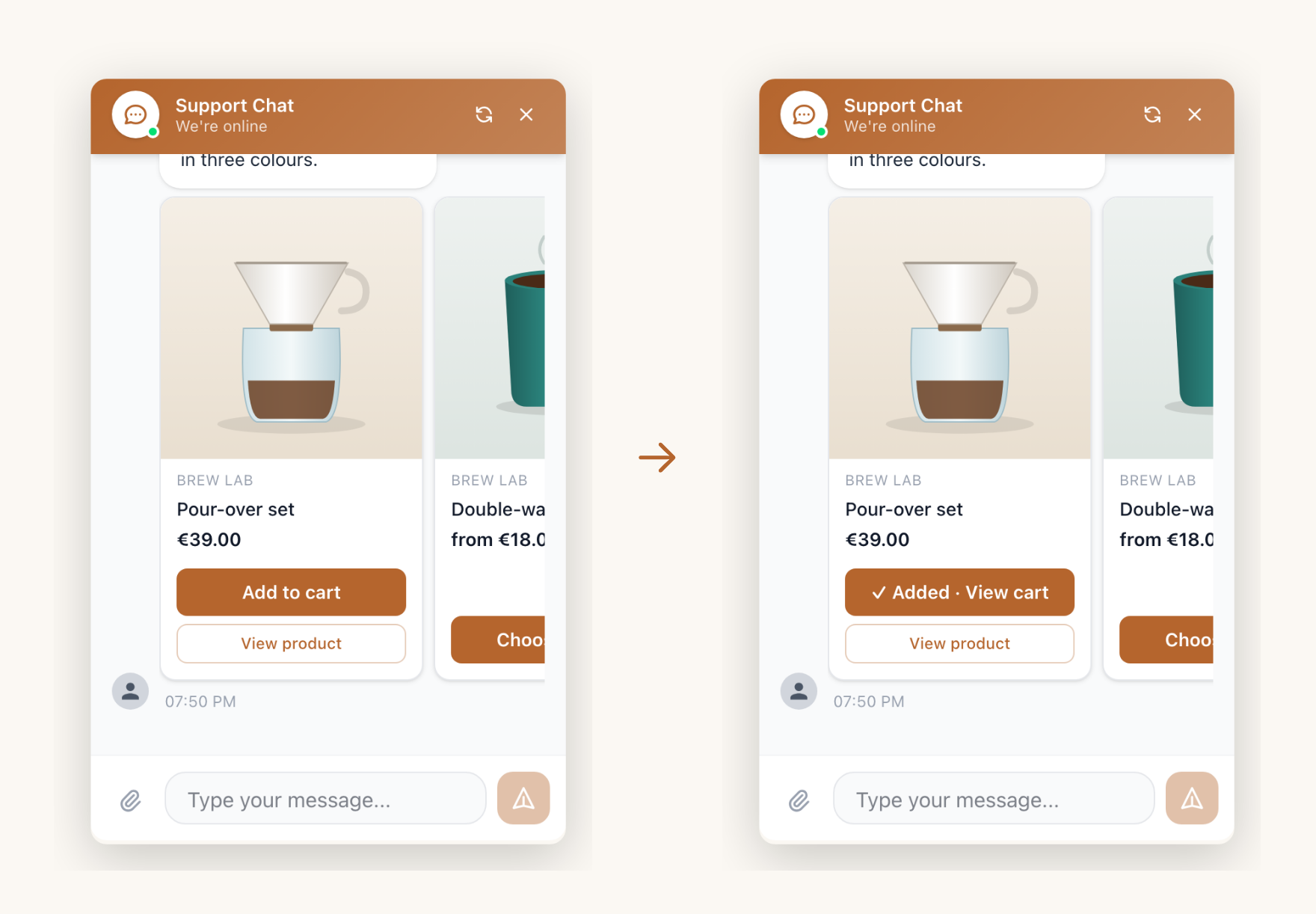
This post is how it works, what it deliberately does not do, and the question it got wrong on its first day live.
The price comes from the shop, never from the reply#
The obvious way to build this is to have the AI write the card: name, price, picture. We did not, because the price is the one thing on the card that has to be right, and we have measured models reading the wrong row of a price list that was sitting right in front of them.
So the AI only writes the link. When the reply is delivered, HelpStack opens the linked page and reads the product data the shop already publishes for search engines: schema.org Product data, with the Open Graph tags as a fallback. WooCommerce prints this by default, and so do most Shopify themes. If the page does not load in a few seconds, or it is not a product page (a shipping policy, a blog post), the link stays a plain link and the reply goes out on time.
For a connected Shopify store we skip the page and ask the Shopify Admin API directly. We found out why on the first test: every Shopify development store sits behind a storefront password, so the server reading the page got the password screen and the merchant testing us never saw a single card. The API answers either way, with the variant ids the cart needs.
Two more rules sit around that:
- Only your own links. Cards are only built for pages on your sites: the widget's allowed domains, the page the visitor is on, and a connected Shopify or WooCommerce store. A link to anywhere else stays a link.
- At most three cards per reply. A support chat is not a catalogue. Three is enough to compare and few enough to read.
The buttons#
A card has up to two buttons, and which one comes first depends on the product, not on the AI:
| Situation | Main button |
|---|---|
| Out of stock | Out of stock, disabled |
| Has sizes or colours, none chosen | Choose options, opens the product page |
| The shop can add it to the cart | Add to cart |
| Anything else | View product |
After a successful add the button turns into Added · View cart.
On Shopify the widget adds the variant through the shop's own cart endpoint, the same one the theme's button uses. On WooCommerce it uses the WooCommerce Store API and tells the mini cart to refresh. Getting that right took a second pass: block themes do not load the classic cart scripts, so our first version could not tell it was on a WooCommerce shop at all, and one block theme's CSS made every simple product look like it needed options. Both are fixed, and we now test on a real block-theme shop.
On any other shop system you register your own handler on the page, and the card uses it. The same call adds extra buttons like Save for later or Book a fitting. The widget docs have the snippet.
When a shopper taps a button, the result goes back into the conversation. If they added the pour-over set and then ask about filters, the assistant knows the set is already in the cart.
What it got wrong on day one#
The first thing our own team typed into the Shopify test store was "what is your best seller?". The reply: it did not have enough store information to identify a best seller, and could we name a category.
The reason was boring. The assistant searched the catalogue for "best seller", and the search only matched product titles. No product is called Best Seller, so it got an empty list and did the honest thing with nothing.
The fix has two halves. The search now falls back: product titles first, then the same words across product type, vendor and tags, and if nothing matches, a few products that are actually on sale. And it tells the assistant what those fallback products are. On WooCommerce they are sorted by real sales, so they can be called best sellers. Shopify's Admin API cannot sort products by sales, so there the assistant is told plainly that these are products on sale, not ranked by sales, and must not be called best sellers.
The second half matters more than the first. An empty answer is annoying. A confident "our best seller is X" that nobody measured is the kind of wrong answer that reaches a customer and stays.
Does it sell more?#
We do not have our own number yet, and we are not going to invent one. What exists is industry data: Shopify reports shoppers are 70% more likely to buy when they can chat with the store, and McKinsey puts the typical revenue lift from personal recommendations at 10 to 15%. Those are other people's figures, measured on other products.
What we can say is what changed in the flow: a recommendation used to cost the shopper four steps on another page, and now it costs one tap. When we have a real shop's before and after, it goes on this blog with the method.
Try it#
Product cards are on by default for every website chat channel, on every plan. If your shop runs Shopify or WooCommerce there is nothing to set up: link a product in a reply, or let the assistant do it, and the card appears. To turn them off, or to add your own buttons, see product cards in the channel guide.
Frequently asked questions
- Can the AI make up a price on a card?
- No. The card is never built from the reply text. HelpStack opens the linked product page, or asks the Shopify Admin API for a connected store, and the price and stock come from there. A link that does not load, or a page that is not a product, stays a plain link.
- Does Add to cart work on my shop?
- On Shopify and WooCommerce it works without setup: Shopify through the shop's own cart endpoint, WooCommerce through the Store API, which block and classic themes both have. On any other shop system you register an add_to_cart handler on your page and the card uses it.
- What happens with a product that has sizes or colours?
- The card shows Choose options and opens the product page, unless the link points at one specific variant. Adding a random size to the cart would be worse than one extra click.
- Can I turn product cards off?
- Yes. Product cards are a switch in the widget appearance settings of each website chat channel. They are on by default.